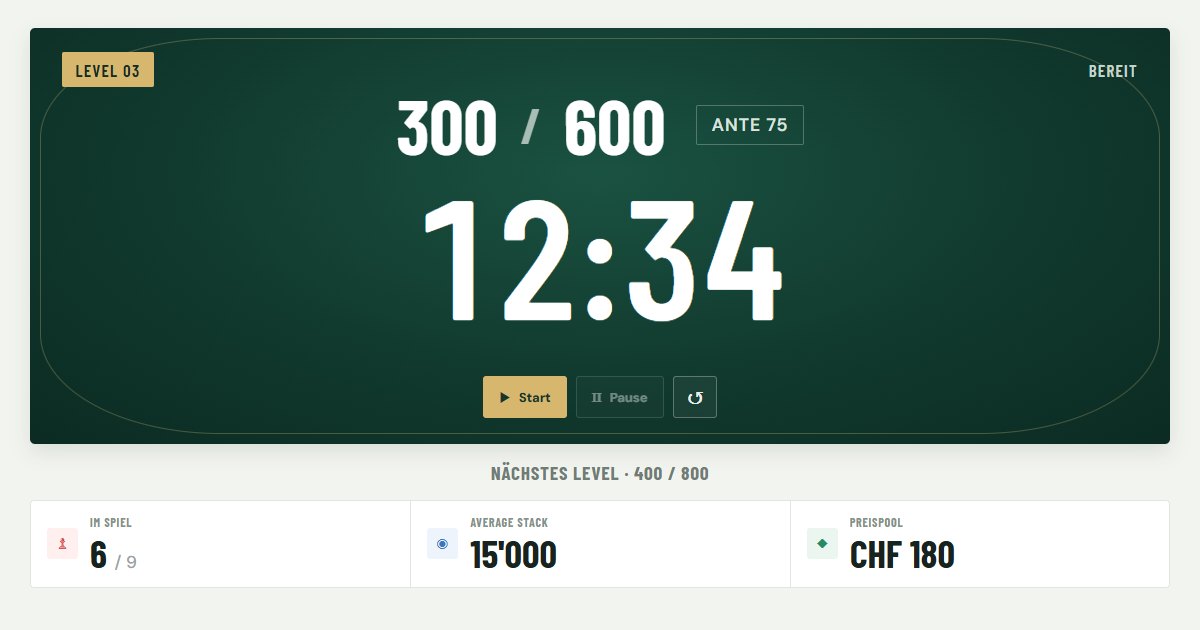
Features of the free blind timer
Level clock with alarm
Countdown per level and a repeating alarm until you confirm it. Choose a subtle, medium or aggressive sound.
Display mode for the TV
One click on fullscreen shows only the clock, blinds, next level and key stats – large enough to read from the table.
Editable blind structure
Add, remove and edit levels and breaks: small blind, big blind, ante and duration.
Blind structure via AI
Enter duration and breaks, copy the generated prompt into ChatGPT, Claude or Gemini and paste the answer back.
Lock and resume
Starting the clock locks level changes and resets against accidental taps. After an interruption, set any level and remaining time to resume mid-level.
Players, rebuys, average stack
Track busts and rebuys with one click; players left and average stack update automatically.
Prize pool and payouts
Set the buy-in and up to 20 paid places. The app suggests places and percentages for your field size and calculates the amounts.
Chip case and starting stacks
Enter the chips in your case: the app works out each starting stack, warns if you are short, checks every blind level against your chips and shows when to colour up.
How to run your tournament
- Open the timer at pokertimer.geekz.ch. Your browser gets its own tournament automatically.
- Enter players and buy-in under “Spieler & Preisgeld” (players & prize money): number of players, starting stack and buy-in.
- Choose a blind structure: keep the default, edit levels with “Bearbeiten” (edit), import a JSON file or create one with an AI chat.
- Test the alarm with “Alarm testen” and pick the sound you like.
- Press Start. Use the fullscreen button for the display at the table. When the alarm rings, “Alarm aus · Weiter” starts the next level.
The interface is currently in German, but everything on the tournament display – blinds, antes, clock, chip counts – is numbers and works in any language.
Blind structure format (JSON)
Import a JSON file or paste it into “JSON manuell bearbeiten”. Each entry is a level ("level") or a break ("break"):
{
  "levels": [
    { "smallBlind": 25, "bigBlind": 50, "ante": 0, "durationMinutes": 20, "type": "level" },
    { "smallBlind": 50, "bigBlind": 100, "ante": 0, "durationMinutes": 20, "type": "level" },
    { "smallBlind": 0, "bigBlind": 0, "ante": 0, "durationMinutes": 10, "type": "break" }
  ]
}
FAQ
Is the blind timer really free?
Yes. Table Time is free, has no ads, needs no account and no installation. It runs directly in your browser.
Can I use the poker timer on several devices?
Yes. The address contains a tournament ID (?t=…). Open the same link on a second device, for example a laptop on the TV and a phone at the table, to control the same tournament.
How long should blind levels be?
For a 3 to 5 hour home game, 15 to 20 minute levels are common; for a turbo tournament, 8 to 12 minutes. A starting stack of 100 to 200 big blinds leaves enough room to play.
Is the app available in English?
The timer interface is currently in German. Blinds, antes, clock and chip counts are numbers, so the tournament display works for any language.
Ready for your next tournament?
Open the free poker blind timer, set your blinds, press start.
Start the poker timer